Session 1: After a brief presentation of the Project Portal assignments we will discuss the requirements for the Technical Exercise #1 Image Optimization. If time permits I will also demonstrate the techniques required to complete the exercise.
Technical Exercise 1: Image Optimization
Due: Session 1, Week 4 (3 points)
Download the Exercise Assets
Description:
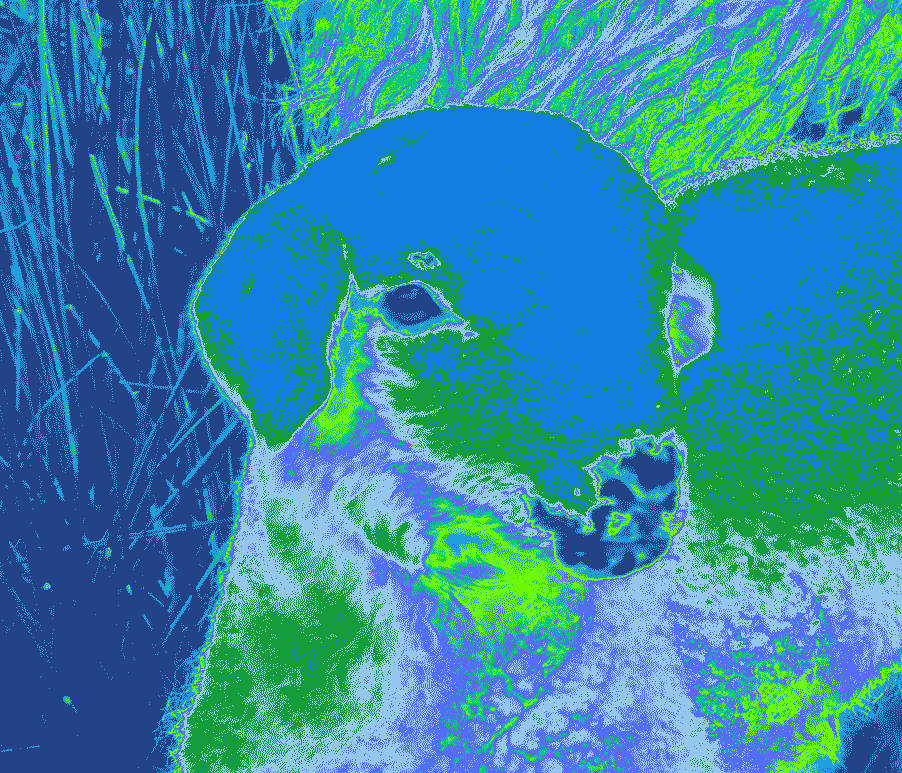
Use Photoshop or GIMP to optimize camera raw images as JPEGs and display them within a single web document. You may use camera raw images of your own, or you may use the provided camera raw images. Next, in the same document display some type converted to graphics using the transparent GIF format and the transparent PNG-24 format. Use a background color other than white and a typeface with plenty of curves to illustrate the advantage of alpha over index transparencies. Finally, experiment with an image of your own to create a 2 by 2 grid of 4 posterized images as an homage to pop artist, Andy Warhol. Create the posterized effect by manipulating the GIF color table in the “Save for Web” dialog box within Photoshop.
Free Photoshop alternative GIMP can also be used to produce this exercise. This video describes how to optimize images for the web using GIMP:
https://youtu.be/B8BUMHuG8Qk
Required reading:
What’s the difference between a jpg, gif, png and svg?
What’s a pixel on screens and in digital images?
Requirements:
1. Create a single web page that documents the tasks listed below
2. Optimize the provided raw images into an appropriate web format
3. Display type converted to graphics using both GIF and PNG-24 formats
4. Produce a grid of your own images manipulated via the GIF color table
5. Add the files and folders to your environment and copy them to your webspace
6. Upload your exercise before class starts on session 1 week 4.
Points Breakdown:
1 point awarded for effectively optimizing the raw images into an appropriate web format
1 point awarded for using type converted to graphics to illustrate the advantage of alpha transparency
1 point awarded for creating a grid of experimental images by manipulating the GIF color table
Session 2: Today we will wrap up demonstrations for the image optimization exercise. Specifically we will place the images we processed into an HTML document and connect it to the project portal. NOTE: automatic code formatting is a feature of many IDEs and text editors that makes formatting your code simple and instantaneous. This article explains how to enable auto code formatting in Visual Studio Code. The key commands are as follows:
Windows: Shift + Alt + F
macOS: Shift + Option + F
Linux: Ctrl + Shift + I
After the demo we will begin discussing the Basic Portfolio Project. This project is designed to allow students to focus on color, design, layout, type treatments, syntax, markup, and styles while creating a web application that features your work, contact information, and an artist statement.
Assignment 3: Basic Portfolio Project
Due: Session 2, Week 8 (25 points)
Description:
Produced and design a web based portfolio. Your web application will feature a minimum of five content areas including work, artist statement, resume, and contact. The work area may breakout into multiple pages to feature up to five specific projects. It’s your job to create an identity and consistent design scheme. Incorporate images of your work, writings, and/or other media such as embedded video or audio. Build a user interface that includes universal navigation, and type treatments using HTML5 and CSS. Pay special attention to type, colors, layout, styles and positioning.
Requirements:
1. Organize your content into a minimum of five content areas
2. Create a consistent design scheme and apply it to your template
3. Include universal navigation on each page to get to every content area
4. Incorporate optimized images appropriate for the content into each page
5. Format type, images, and the positioning of the content with CSS
6. Upload to your personal webspace before class on session 2 of week 8
Points Breakdown:
6 points will be awarded for designing an effective layout for the content and interface items
5 points will be awarded for a consistent and distinct universal navigation system
4 points will be awarded for placement, optimization, preparation, and choice of images
5 points will be awarded for carefully selected typefaces and type treatment
5 points will be awarded for the clarity of your presentation
https://www.shopify.com/blog/7412852-10-must-know-image-optimization-tips
This first link brings you to a site that shares “10 Must Know Image Optimization Tips” It could be beneficial to anyone who plans to run/manage an online store. It explains the best practices to follow to increase traffic to the store’s site.
http://lifehacker.com/learn-when-to-use-jpeg-gif-or-png-with-this-graphic-1669336151
This link further explains when to use JPEG,GIF or PNG with a graphic. It highlights the benefits of using each.
http://www.smashingmagazine.com/2008/04/getting-creative-with-transparency-in-web-design/
This link explains how to use Transparency in a web design. It gives examples and advice on how to manipulate different image files to get successful transparency. This website also navigates you to different parts of web design.
http://www.techradar.com/us/how-to/computing/how-to-use-onedrive-1308522/3
This link brings you to an article called, “How to use OneDrive,” and explains the purpose and functions of OneDrive, and a few of the top ways you can make it useful for your own storage purposes.
http://www.howtogeek.com/howto/30941/whats-the-difference-between-jpg-png-and-gif/
This article, “What’s the Difference Between JPG, PNG, and GIF?” explains exactly this question. It also describes what purposes each file type is best used for.
http://www.w3schools.com/colors/colors_picker.asp
This link brings you to the HTML Color Picker–last week we talked about different codes for different colors, and this page shares the codes for all kinds of shades, which can help to further personalize and add creativity to your webpage.
http://www.ebrueggeman.com/blog/image_optimization
This link gives a basic overview of image optimization. It talks about what it is, why you should optimize your images and then briefly walks through how to do it. It really helps to get a better understanding of image optimization!
https://www.sitepoint.com/gif-png-jpg-which-one-to-use/
This link talks about the differences between GIF, PNG, and JPG and also gives a basic guideline as to when you should use each one. It also provides examples so you can see the differences between the three and which one would look best for what you’re trying to do.
https://premium.wpmudev.org/blog/image-optimization-guide/?utm_expid=3606929-84.YoGL0StOSa-tkbGo-lVlvw.0&utm_referrer=https%3A%2F%2Fwww.google.com%2F
This link goes a little deeper into the details of image optimization. It talks about the two different types of images (raster and vector), different file types and their advantages, the importance of image optimization, and then gives you tips for optimizing your image.
http://www.websitebuilderexpert.com/how-to-choose-color-for-your-website/
This article walks you through choosing the colors for your website. It touches on certain aspects such as choosing your colors, where to use certain colors on your website, how you can use color to promote a business and how you can use psychology to influence the look and use of your website.
https://developers.google.com/web/fundamentals/performance/optimizing-content-efficiency/image-optimization?hl=en
This article walks you through how to optimize images correctly for web use, the difference between vector and raster, selecting the right file format and other techniques for adding images to a website.
https://colorlib.com/wp/html5-portfolio-website-templates/
I included this third link as inspiration to see what can be achieved through html5 and css coding. Granted these examples are very detailed and the coders are very skilled, they still provide inspiration in terms of images, layout, grids, positioning, content and navigation that can be helpful in building a website.
http://inobscuro.com/tutorials/optimizing-images-for-web-35/
This link has good information on why you should optimize your images for the web. If you scroll down to the bottom of the page you will find examples of what images look like when they’re optimized vs. not optimized and how that effect the quality of your website.
https://developers.google.com/web/fundamentals/performance/optimizing-content-efficiency/image-optimization
I included this link because it seems like it would be super helpful if you really knew what your doing with web design and image optimization, although the language is a little too advanced for me. I would be frustrated if I was looking for more in depth links in this section and could only find ones explaining basic concepts. So, if thats you, take a look at this! (Its not all that hard to understand if you take the time to really read and look up things mentioned in the article you might not know about coming into it.)
https://yoast.com/image-seo/
This article introduces some interesting concepts to improve your SEO just by optimizing and doing various things to your images. Its a good read if you want to learn image optimization and also learn a little about SEO.
https://www.abetterlemonadestand.com/optimizing-images-for-web/
This link includes an informative, step-by-step article about how to optimize images for the web. I found it very thorough in walking through each step, using pictures to show what it looks like to do each task, and providing unfamiliar users with all the details of image optimization. There is even a step-by-step video at the end!
https://www.w3schools.com/css/css_image_transparency.asp
This link leads to w3schools, which has tons of related how-to articles. This article is about image transparency and opacity to create different image effects on webpages. I found it helpful because it has step-by-step instructions and examples of what it looks like in HTML when you create these rules using CSS.
http://amberbluemedia.com/tips-for-web-design-and-layout/
This article has over 12 tips regarding website design and layout, including text, transparency, color and design. It is less of a step-by-step tutorial about how to make your webpage happen, but very helpful in deciding the why behind your decisions.
http://help.adobe.com/en_US/creativesuite/cs/using/WS6E857477-27FE-4a88-B8A4-074DC3C65F68.html
This is the how to section direct from Adobe on how to optimize photos for the web. It tracks what we learned in class but I always like to get help directly from the software company.
http://cruxcreative.com/rgb-vs-cmyk-when-to-use-which-and-why/
This link is a quick explainer of the difference between RGB and CMYK color. Bottom line – use RGB for the web and CMYK for printing.
https://www.shopify.com/blog/7412852-10-must-know-image-optimization-tips
This is a really good how-to on optimizing photos in an e-commerce site. It also has a link to a Google page on their image publishing guidelines. https://support.google.com/webmasters/answer/114016?hl=en
https://shortiedesigns.com/2014/03/10-top-principles-effective-web-design/
The link provided gives 10 principles to designing a website. The basic gist of it is that you’re designing your website for the users, other people, and not just for yourself so you have to be able to make it easy for them to use and be able to get your information or message across to them. You have take into consideration the colors and fonts to be used while also thinking about how your web layout should be like as there are technical limitations and restraints.
https://www.canva.com/learn/12-common-image-formatting-mistakes-avoid-website/
Moving on, this link focuses on the image formatting for websites. As you should have learned about efficiency from the link above, this will further expand upon that with sizing, resolution, cropping, scaling, and formatting of images. Details about things such as the “Rule of Thirds”, which is about achieving balance and focus, arrangement, and basic image structure data. If needed, there are links to other tips and information in relation to Canva, the service for designing images. Although mainly for Canva, you should be able to relate and or translate any information over to other works. Like photo editing using Adobe, Paint.NET, or GIMP.
https://developers.google.com/web/fundamentals/design-and-ux/responsive/images
The link provided focuses on responsive images, but it is recommended to view all content under the “Responsive Web Design” section. The section focuses on the use of CSS on images to make them more responsive, so adjusting images depending on the device that is being used to view them, and thus should build upon the previous two. Has insights on Media queries for conditional directing based on device used, thus if media queries don’t match then some images won’t be downloaded and applied and thus could mean for improvement on webpage speeds. More speed ups can be obtained from usage of sprite sheets, lazy loading, and the usage of Unicode characters. Alternatives to images can be done with CSS, as long as you keep the design in moderation, thus increasing speed. It may be helpful to just view all sections and articles for good web development skills.
https://helpx.adobe.com/photoshop-elements/using/optimizing-images-jpeg-format.html
This link goes over image optimization for JPEG. It also describes choosing a quality size.
https://helpx.adobe.com/photoshop-elements/using/using-transparency-mattes.html#create_a_matted_gif_or_png_image
This link talks about how to preserve background transparency for GIF and PNG images. It also talks about how to create a matted JPEG image.
http://inobscuro.com/tutorials/optimizing-images-for-web-35/
This link shows the differences between all three (JPEG, GIF, PNG) at the bottom of the page. There is also an overview of how to save to the web.
https://imagekit.io/blog/image-optimization-its-importance/
This article goes through what image optimization is and some basic reasons why image optimization is important on a website, like improved loading speed, improving SEO ranking and enhancing user engagement.
https://prosky.co/careerbuzz/articles/5-benefits-of-creating-an-online-portfolio
This article/blog post discusses what the benefits are of having an online portfolio and how important it is to have one if you are planning on working in a creative industry. Having an online portfolio shows employers that you can produce results. An online portfolio also increases networking and reputation.
https://www.hover.com/blog/online-portfolio-site-importance/
This is a study that walks through whether having an online portfolio has effect on hiring decisions or not. It was interesting to see that at first, people seemed quite neutral, but as it went on, the participants responded that portfolio site quality would affect hiring decisions, and that employers will visit the site if a candidate has one.
https://developers.google.com/web/fundamentals/performance/optimizing-content-efficiency/image-optimization
This article discusses just how many bytes images can eat up by giving examples of the file size of different photo dimensions and pixels. After this, it goes on to explain how if you want to preserve the photo’s fine detail with the highest resolution, you should use the png. format. If you’d rather reduce the file size, jpg. format is normally best.
https://kinsta.com/blog/optimize-images-for-web/
This article discusses how you want to find a happy medium between balancing the reduction of the image’s size to better your website’s performance, with the maintenance of the image’s desirable quality. It says images make up on average 54% of a webpage’s weight, so it is important to decrease their file size to acquire a fast loading speed, making your website rank higher on search engine results. However, the higher the compression, the lower the quality, making optimization a tricky balancing act.
https://graphics-unleashed.com/2018/08/optimizing-your-images-for-the-web/
This article goes over a website that uploaded photos with too high of a resolution to its website. It suggests using no wider than 1200 pixels, and makes corrections to show how you can cut a website’s size in half to improve its SEO, make the page load faster, save space on your server, and increase the bandwidth of your site!
https://www.uxbooth.com/articles/speed-up-your-website-with-better-image-optimization-in-photoshop/
This website does a really great job with giving further details and explanation about the differences between image qualities, compression, and saving for the web.
https://www.html5rocks.com/en/tutorials/speed/img-compression/
This is an interesting read, it goes into detail why having large, uncompressed images actually costs more money for your readers due to long website download times. Compression Matters!
http://www.whydomath.org/node/wavlets/basicjpg.html
This link explain the basic JPEG algorithm for compressing digital still image.
https://developers.google.com/web/fundamentals/performance/optimizing-content-efficiency/image-optimization
This link gives a broad idea of what is Image Optimization and goes into detail of what Vector vs. Raster images is.
https://www.digitaltrends.com/photography/jpeg-vs-png/
This link explain what is the difference is between jpeg and png. It also goes over which one is better depending on your needs.
https://www.searchenginejournal.com/on-page-seo/image-optimization/#close
This article shows tips for optimizing images that go even further than the tips we discussed in class.
https://strongcoffeemarketing.com/blogging-2/tips-for-taking-high-quality-photos-for-your-website/
This article steps back a bit and outlines best practices for executing photography that will make your website look best.
https://yoast.com/image-seo/
This recent article outlines some of the most up-to-date tips for doing image optimization with current search engine algorithms.
https://www.wpbeginner.com/beginners-guide/speed-wordpress-save-images-optimized-web/ This is a great resource for beginners on how to optimize pictures. It breaks down the steps and goes into detail about why image optimization is important. It also includes a video tutorial for those who are visual learners.
https://www.signatureedits.com/free-raw-photos/ Here is a link to free raw photos. I thought this would be helpful for our Image Optimization assignment. You could use these for extra practice, or use them in place of the photos we’ve been given by Keston. This web page also has a ton of tutorials for editing in raw if you’d like to check them out.
https://www.signatureedits.com/free-raw-photos/
This article discusses image format. It breaks down the differences between JPG, PNG, GIF, and WebP, and tells you how and when to use them.
https://kinsta.com/blog/optimize-images-for-web/
This blog was about optimizing images. Optimizing images is the process of decreasing their file size in order to speed up the load time of the page. This blog has step by step tutorials on how to do them.
https://www.signatureedits.com/free-raw-photos/
This website breaks down what a raw image is. It also breaks down the different types and shows what is the most effective one to use depending on the situation.
https://helpx.adobe.com/photoshop-elements/using/using-transparency-mattes.html#create_a_matted_gif_or_png_image
This website was about saving the background for GIF and PNG images. This website also demonstrates how to create a JPEG.
https://www.seniorsignite.com/size-images-for-web/
This is an article that explains how to optimize images for a website. It explains the difference between JPEG’s and PNG’s, when to use each, and what to name your photos.
https://www.htmlgoodies.com/tutorials/web_graphics/from-camera-to-browser-optimizing-images-for-the-web.html
This website explains the basics of image optimization and explains how to prepare images for the web and the difference between JPEG and PNG.
https://helpx.adobe.com/photoshop-elements/using/optimizing-images-png-24-format.html
This is directly from Adobe which gives more information about the PNG-24 format.
https://kinsta.com/blog/optimize-images-for-web/
this goes through why it is important to optimize images as well as considerations to take into account when you go to optimize your images. It gives examples detailing what can occur when the image is highly compressed vs has low compression etc.
https://helpx.adobe.com/animate/using/optimization-options-for-images-and-animated-gifs.html
A guide from adobe that goes through options for png, gif, and jpg. this has some great examples and photos that illustrate the concepts nicely.
https://web.dev/choose-the-right-image-format/
Directly from Google Developers, this details statistics and logistics of why you want to optimize your images. It looks at raster vs vector graphics as well as what can occur on different screen resolutions.
raw image resource!
https://www.signatureedits.com/free-raw-photos/
https://neilpatel.com/blog/image-optimization/
This site explains image optimization and some helpful tips for what is important to remember and why, such as that it improves site speed and user experience. This article also talks about the difference between image files such as JPEGs, PNG, and GIFs as well as image compression and image optimization.
https://abcprint.com/about-us/news-archive.html/article/2021/07/08/raster-vs-vector-images-what-s-the-difference-#:~:text=Differences%20Between%20Vector%20and%20Raster,directs%20the%20route%20and%20shape.
This article explains the difference between Raster vs. Vector images and what they are both used for. This site is helpful because it gives examples of both Raster and Vector images such as that Raster images are better for photographs and Vectors are better for logos and illustrations. This article also explains the different file types associated with both Raster and Vector images.
https://www.wpbeginner.com/beginners-guide/speed-wordpress-save-images-optimized-web/
This article explains what image optimization is and how to optimize an image. The article mentions that Adobe Photoshop is a good source for image optimization. This article also provides insightful information regarding the importance of file format, compression, and image dimensions.
https://medium.com/live-view/how-to-make-your-raw-files-look-even-better-1f019e79e5c0
This web page explains what a RAW file is and how to edit those files. It is helpful in understanding how to put RAW files into other formats.
https://wpmudev.com/blog/best-image-formats-png-vs-jpg-svg-gif-webp/
This website helps readers understand what image format looks best for different purposes on a website. It explains how compression works on different images and how to use it on websites.
https://contentmarketinginstitute.com/articles/optimize-images-seo/
This article gives 10 ways to optimize images for SEO.
https://www.freecodecamp.org/news/how-to-create-a-portfolio-website-using-html-css-javascript-and-bootstrap/
Description: This YouTube tutorial walks through the process of building a portfolio website using HTML and CSS. It covers topics such as structuring content, styling with CSS, creating navigation, and incorporating images and media. This resource is relevant for students working on the Basic Portfolio Project, providing practical guidance on design and implementation.
https://blog.hubspot.com/marketing/color-theory-design
Description: This article discusses color theory principles and provides tips for choosing the right color scheme for a portfolio website. It covers concepts such as color wheel, complementary colors, analogous colors, and more. Understanding color theory is essential for creating a visually appealing and cohesive design scheme, which is a requirement for the Basic Portfolio Project.
https://www.phixer.net/blog/image-formats-explained/
Description: This article provides an in-depth explanation of various image file formats, including JPEG, GIF, PNG, TIFF, and BMP. It discusses the characteristics of each format, such as compression methods, transparency support, and suitability for web use. Understanding these formats is crucial for optimizing images for the web.
https://shotkit.com/free-raw-photos/
-> This link provides a lot of free raw photos for our image optimization assignment.
https://backlinko.com/image-seo
-> This article explains how important image optimization is regarding search engine optimization (SEO). There are also tips for image optimization along with their benefits.
https://smartprintingcompany.co.uk/difference-between-vector-and-bitmap-images/
-> This link talks about the difference between vector and bitmap, what are their advantages, and when to use either of them. We also covered a bit of this topic in class.
https://bloggingwizard.com/image-optimization/
-> This casual blog writes about why image optimization matters in general. It also shows some methods to optimize your image with examples including Saas tools.
https://www.fastly.com/learning/what-is-image-optimization/
– This website gives you general information on image optimization why image optimization is important, how it works, and its benefits.
https://www.adobe.com/uk/creativecloud/photography/discover/image-optimisation.html
-This is a guide by Adobe on how to do image optimization. I found it helpful that they were broad yet specific to details such as adding alt text.
https://www.builder.io/blog/fast-images
-This shows you how to apply an optimized image into HTML
https://techxplore.com/news/2024-08-tech-boosts-real-compression-ai.html#google_vignette
This is an article about new ai technology that seeks to innovate the current of compression of images.
https://www.biometricupdate.com/202408/preservation-of-biometrics-with-ai-image-compression-less-than-meets-the-eye
This is an article which relates to fingerprint imaging and the potential use of ai to help researchers maintain a consistent image quality.
https://www.itnonline.com/content/new-open-mri-system-provides-optimal-patient-comfort-image-quality-space-and-cost-saving
This is an article about a new mri machine that claims to hold strong image processing capabilities. In medicine image compression appears important as well.
https://insights.samsung.com/2019/12/05/pushing-productivity-with-pixels-why-monitor-resolution-matters/
– I felt that this article further explains what a pixel is, which helps further explain the required readings for the week. Additionally, it expresses the importance of why monitor resolution, which I find interesting.
https://www.edgeoftheweb.co.uk/blog/perfect-website-photos
– I found this specific article helpful, as it may help us decide on images to include for our project portal. This is totally subjective and explains more from a website perspective (not “project portal”); however, I found that it has some good tips and notes to keep in mind for choosing images.
https://www.imperva.com/learn/performance/image-optimization/
– While there are several articles above that help define image optimization, I found that this article is a short and sweet summary that continues to build understanding on the concept. There is more on Imperva’s CDN (content delivery network) toward the end, which is unnecessary to read, but everything above it is helpful.
https://www.ever-wonder.com/muse/how-to-optimize-images-for-web-a-practical-guide#:~:text=Use%20the%20right%20file%20format,for%20search%20engines%20and%20accessibility.
This article is a “how to” guide on how to optimize images for the web. It includes explaining what image optimization is, image compressions, ideal format, and lastly, how to do image optimization on Squoosh, which is a free image optimizer extension. It gives a nice table of contents, so you can jump to whatever you want to learn about.
https://618media.com/en/blog/image-optimization-for-seo/
This article gives information on the importance of how optimizing images can improve search engine optimization (SEO) for a website. It gives “how to” optimize an image and then also includes the use alt text and file names to make the images more discoverable in the search. This article also includes a table of contents, so you can jump to whatever you want to learn about.
https://storeseo.com/blog/perfect-image-sizes-for-websites-ultimate-guide/
This article gives information about finding the perfect image size for a website. Based on website performance, user experience, and then also tying in SEO. The article also provides HTML attributes and CSS techniques for website performance to ensure that your image will look the same across different devices.